
Hera to Swamp Teleport
This underworld glitch can be used to clip from Tower of Hera Big Chest Room to Swamp Palace Hammer Switch.
By clipping partially into the lower-left corner of the room, a downward teleport can be used to reach Swamp Palace Hammer Switch. Link's position must be at 0E83, 05BC to trigger the downward teleport and trigger the screen transition using a down-left movement. Two setups are commonly used to clip into this position: one using a bomb, and the other using an dash clip.
This is one of the few underworld clips that is both allowed and in logic in the Hybrid Major Glitches ruleset.
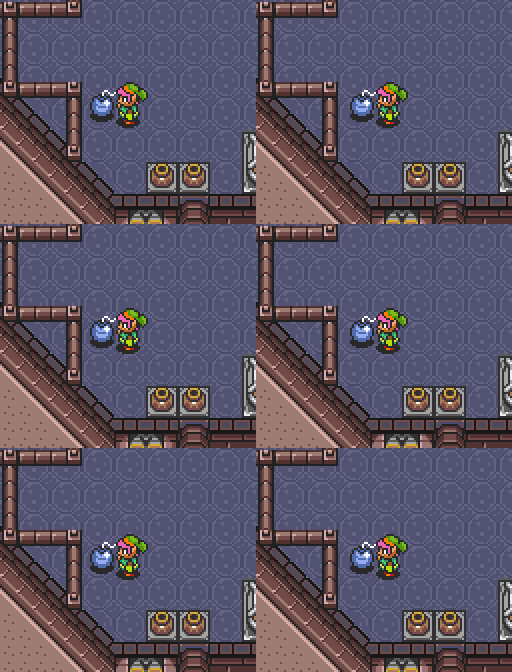
For the bomb setup, the bomb can be placed in any of 9 positions (forming a 3x3 square), as shown in the animation above. Note that it is also possible to clip into the wall using other bomb placements, but these are the 9 that work for the normalized setup described below.
| Bomb Coords | Place Left Coords | Place Down Coords | Place Up Coords | Throw Left Coords | Throw Down Coords |
|---|---|---|---|---|---|
| x:0E8A-0E8C | x:0E90-0E92 | x:0E82-0E84 | x:0E82-0E84 | x:0ED5-0ED7 | x:0E82-0E84 |
| y:05A2-05A4 | y:0596-0598 | y:0586-0588 | y:059E-05A0 | y:0592-0594 | y:053F-0541 |
The above table gives the valid ancilla coordinates of the placed bomb, and the respective coordinates where Link needs to be in order to place (or throw) the bomb in/to that position while facing different directions.
Link's vertical coordinate can be set to 0598 by pressing flush against the top of one of the large 2x2 pots/pits on the bottom of the screen. From there, you can walk left until Link's horizontal coordinate is 0E90, 0E91, or 0E92, then place a bomb to the left.
Link's horizontal coordinate can be set to 0E90 by walking downward along the diagonal slope until flush with the bottom wall (make sure to move continuously downward along the slope for at least 2 pixels of movement, or there is a chance of being at 0E8F instead.). From there, you can walk upward until Link's vertical coordinate is 0596, 0597, or 0598, then dash-turn to place a bomb to the left.
The lineup can also be achieved by bonking against the wall and walking downward to one of those same vertical coordinates, though this is slower than simply walking upward. Note that if the left-hand pot has been lifted, Link's horizontal coordinate will instead be 0E92 after the bonk -- two pixels further rightward -- but this bomb placement will still work for the setup described below without modification.
After placing the bomb, you'll want to normalize Link's position and subpixel coordinates to ensure the correct bomb knockback as you dash left into the explosion. Specifically, Link's vertical coordinate needs to be 05C0.00 and his horizontal coordinate can be anything that ends in a subpixel value of .80. Dashing into the bomb explosion from one of these positions will place Link at 0E83, 05C0 after being knocked downward.
One simple way to do this (shown above) is to walk down (and left, if necessary) into the corner to 0E90, 05C0 (making sure to move continuously downward along the slope for at least 2 pixels of movement), then buffer a single frame of leftward movement, which will put you at 0E90.80, 05C0.00.
Accidentally moving left for two frames instead of one will put you at 0E8F.80, 05BF.00, at which point you can correct your vertical position by pressing down (any number of frames) and then attempt to move right for one frame.
If you accidentally move left for three or more frames, you can simply hold down to reset yourself to 0E90, 05C0, at which point you can attempt the single frame leftward movement again.
An alternative setup (from the same corner position) is to lift the left-hand pot (if it has not already been lifted), then buffer a single frame of rightward movement, placing Link at 0E91.80, 05C0.00.
If you accidentally get two frames of rightward movement instead of one, your horizontal subpixel value will be .00), so you'll need to attempt an additional horizontal one-frame movement to re-normalize your horizontal subpixel position. (this can be repeated several times, if necessary)
From 0E83, 05C0, move upward exactly 4 pixels to 0E83, 05BC by buffering two separate one-frame upward movements, then teleport using a clean down+left movement.
A quick way to do this is by using two sword buffers (transitioning to down+left during the second sword slash), though some runners may find it more comfortable to use a third sword slash to buffer the down+left diagonal.
If your first upward movement ends up accidentally being two frames instead of one, you can still correct yourself by moving one frame to the right, then moving one frame up+left, which will place you back at 0E83, 05BC for the teleport.
The mini-moldorm in the upper-right corner of the room occupies sprite slot 0, which can potentially trigger abnormal bomb knockback due to affecting Slot 0 Altitude/Height if its drop is collected in mid-air. While this is normally not relevant since that enemy can be ignored in most cases, this can also commonly cause issues if it is replaced a floating/flying enemy such as a bari, in which case the bomb clip will fail.
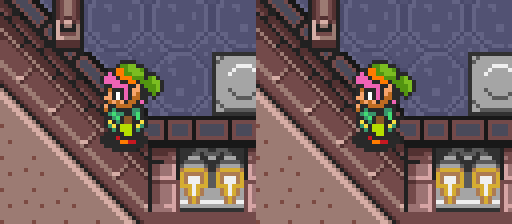
If you failed to properly normalize your position before the dash into the bomb (or used a slightly different bomb setup), you may end up clipped into the slope at a different horizontal position, such as 0E82 instead of the desired coordinate of 0E83.
If you recognize this offset, you can safely correct your position via one-frame horizontal movements before attempting the teleport -- as long as you remain 0E80, 05C0 and 0E8A, 05C0, you can make horizontal movements while still remaining clipped into the corner.
Alternatively, the teleport can also be done from 0E82, 05BB, so you can move upward 5 pixels from 0E82, 05C0 and then teleport from there. This can be done via 3 frames of continuous upward movement.
Start Position
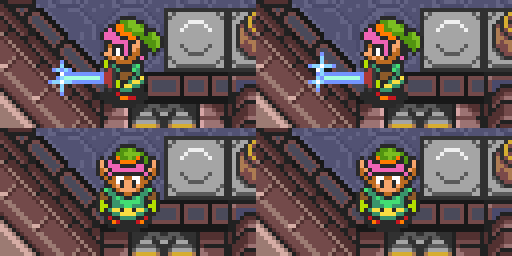
The dash clip setup starts from coordinate 0E8F, 05C0.
Walking downward against the slope normally for 2 or more frames will overshoot this coordinate and place you at 0E90, 05C0 instead.
To reach the correct starting coordinate, you can tap downward repeatedly in small bursts, as shown above. While not required, you can elect to slow Link's subpixel movement pattern during this, either by slashing and hold your sword out, or by holding a nearby pot. Though slightly slower overall, this makes the timing window for the downward taps more lenient, generally allowing 3-frame down presses instead of requiring 2-frame down presses.
Alternatively, from 0E90, 05C0 you can move up-left for one frame and then press down (any number of frames) to clip leftward by one pixel to the correct position.
Step by Step
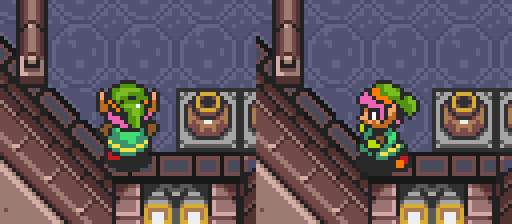
Move diagonally up+left for 3 frames to 0E8C, 05BD. Note that this step can be done even with the slower subpixel movement from having Link's sword held out, if you wish to use the sword out setup for the previous setup without losing time to a spin slash.

Dash to the left and pause at the position shown above, after Link moves 2 frames to the left (8 pixels) to 0E84, 05BD. Link will stay in this position across two frames (2-3 frames after starting the dash), so there is a 2-frame timing window for this pause.
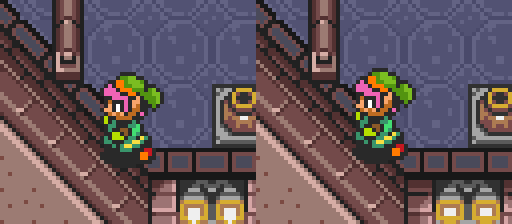
Hold up+left for 2 or 3 frames, moving Link to 0E83, 05BC or 0E82, 05BB. Link will not move on the first frame (the up+left input will cancel the dash).
Teleport with a clean down+left input.
Without boots, a manual citrus clip must be used as shown above, involving several more frame-by-frame movements (and time).
Step by Step
Start at 0E8F, 05C0 (preferred), or 0E90, 05C0. For directions for moving into these coordinates, reference the Bomb Clip and Dash Clip setups above.

Buffer a single-frame up-left input, then press down (any number of frames), clipping Link leftward by one pixel. Repeat this until Link reaches 0E8D, 05C0. If you started at horizontal coordinate 0E8F, you'll need to do this twice; if you started at 0E90, you'll instead need to do it three times.

Move up-left for three frames, to 0E8A, 05BD.
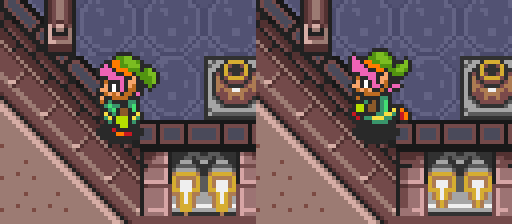
Move left 6 pixels (4 continuous walking frames, or 3 separate leftward movements) to 0E84, 05BD.
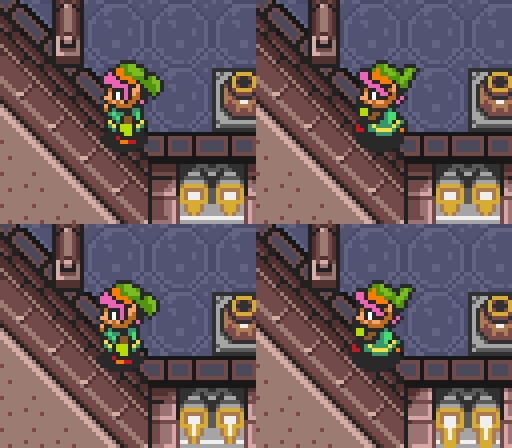
Move up-left for either one or two frames, to 0E83, 05BC or 0E82, 05BB.
Teleport with a clean down-left input.